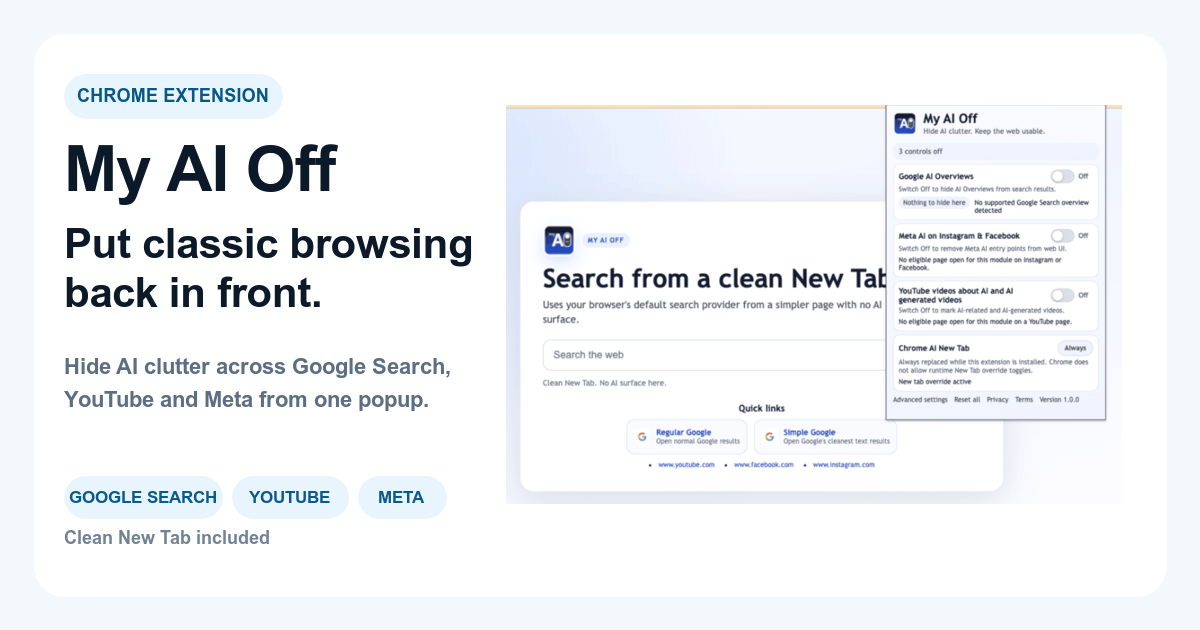
You cannot directly turn off Google AI Overview using a built-in setting from Google itself. Google integrates these AI-generated summaries into search results by default, aiming to provide quick answers. While no native toggle exists, users can employ third-party tools to effectively manage and remove these sections from their browsing.
Understanding Google AI Overview: What it Is and Why it Appears
Google AI Overview is an experimental feature that presents an AI-generated summary at the top of search results pages. Google AI Overview is an experimental feature that presents an AI-generated summary at the top of search results pages. This summary intends to answer your query directly, often before you click on any traditional web links. It synthesizes information from various online sources, highlighting what Google's AI identifies as the most relevant answer or context for your search.
The primary goal behind AI Overview is to streamline information access. For complex questions or topics requiring a summary, Google designs these overviews to be helpful, offering a rapid grasp of the subject. However, its frequent appearance can disrupt users who prefer to examine original sources, conduct detailed research, or simply wish to scan a list of traditional search links.
Many users frequently ask, why is Google AI Overview showing up so often? It appears for a wide range of queries, spanning from factual questions to more nuanced informational searches. Google's algorithm determines when an AI Overview might be useful based on query intent, subject matter, and the availability of quality web sources. This means it can surface even for searches where a simple list of links would be more appropriate, creating a search interface that feels less controlled and potentially cluttered.

Can You Turn Off Google AI Overview Directly?
The straightforward answer regarding whether can you turn off Google AI Overview through a dedicated setting within Google Search itself is no. The straightforward answer regarding whether can you turn off Google AI Overview through a dedicated setting within Google Search itself is no. Unlike some customizable features that offer an opt-out, AI Overviews are part of Google's ongoing integration of generative AI into its core search product. This means you will not find a button in your Google Account settings, nor a preference toggle on the search results page, that allows for universally disabling these summaries.
This absence of a direct control option can be frustrating for users who prioritize traditional link-based search results or find the AI summaries redundant or distracting. Because google ai overview cannot be turned off through conventional means, users must explore alternative strategies to regain control over their search experience. These methods typically involve browser-level interventions, such as extensions or custom ad-blocking rules, that modify how the search page renders for individual users. The approach you select will depend on your comfort with technical setup, your preferred browser, and the level of control you desire over your daily browsing.
Browser-Level Solutions to Disable AI Overview
Since Google does not offer a native off switch, users must employ external tools to disable AI Overview sections effectively. Since Google does not offer a native off switch, users must employ external tools to disable AI Overview sections effectively. These methods primarily utilize browser extensions or custom filter lists to modify the content displayed on Google Search results pages. Each approach comes with its own setup and maintenance considerations.
-
Specialized Browser Extensions: Dedicated browser extensions are often the most straightforward and effective solution. These tools are built specifically to identify and hide AI Overviews and other AI-generated content blocks on Google. They typically work across various Google services, providing a consistent experience. Examples include extensions like My AI Off, which focuses exclusively on removing AI clutter from popular sites. This is generally the recommended approach for users seeking a simple 'install and forget' solution without complex technical steps.
-
Ad Blockers with Custom Filters: General-purpose ad blockers such as uBlock Origin can also be configured to hide AI Overviews. This method requires adding custom filter rules that specifically target the HTML elements Google uses for its AI Overview boxes. While highly effective for those comfortable with filter syntax, this approach demands more technical knowledge to set up and maintain, as Google's page structure can change, potentially requiring updates to your custom rules. For a detailed comparison, consider My AI Off vs. uBlock Origin.
-
Search Engine Alternatives: A more comprehensive, yet equally effective, method is to switch to a different search engine that does not feature AI Overviews, such as DuckDuckGo or Brave Search. This circumvents the problem entirely but means giving up Google's specific indexing and search features, which might not align with every user's needs.
For many, a targeted browser extension offers the best balance of ease-of-use and effectiveness, allowing them to continue using Google Search without the visual interruptions. You can find more specific guidance in articles like How to Turn Off Google AI Overview.
Practical Scenarios for Removing AI Overviews
Understanding when and how to remove AI Overviews depends significantly on your specific browsing habits and information needs. Understanding when and how to remove AI Overviews depends significantly on your specific browsing habits and information needs. Below are several practical scenarios and the most effective approaches to manage AI clutter in each context.
| Scenario | Recommended Approach | What To Avoid | Explanation |
|---|---|---|---|
| Verifying Quick Facts | Use a dedicated AI-blocking extension (e.g., My AI Off) | Constantly refreshing the page or manually scrolling past the AI summary | When you need a quick, verifiable fact, AI Overviews can distract from authoritative sources. An extension ensures you see traditional links first, leading directly to vetted information. |
| Conducting Academic Research | Specialized AI blocker alongside manual source verification | Relying solely on AI summaries for citations or complex topic understanding | For in-depth research, AI Overviews may oversimplify or misinterpret complex topics. Focus on primary sources, which become quickly accessible after removing the AI block. |
| Troubleshooting Technical Issues | Browser extension or specific custom filter rules for precision | Searching for highly specific error codes and accepting the first AI summary as a definitive solution | Technical solutions often require precise steps or detailed discussions found in forums. AI Overviews can generalize, potentially leading to irrelevant or incorrect advice. |
| Shopping for Products Online | Browser extension for a cleaner product comparison view | Expecting AI to provide unbiased product reviews, accurate pricing, or comprehensive specifications | AI Overviews can sometimes feature product placements or generic advice. Seeing traditional commerce links allows for direct comparison from trusted retailers and review sites. |
| Finding Recipes or DIY Guides | Extension to clear AI blocks, then focus on established recipe sites | Browsing without a blocker, expecting consistently concise and accurate instructions from AI summaries | AI Overviews for recipes can be inconsistent, sometimes combining incompatible ingredients or steps. Direct access to established recipe sites ensures reliable and safe instructions. |
| Following News and Current Events | Browser extension for direct access to reputable news outlets | Allowing AI to curate or summarize breaking news, especially during critical developments | AI summaries can lack nuance or omit critical details in fast-evolving news. Direct links to journalistic sources provide full context and multiple perspectives. |
| Personal Learning & Skill Development | Use an extension to enable direct access to structured tutorials and courses | Relying on generic AI answers for learning complex skills or new software | Learning new skills requires structured content, often from dedicated educational platforms or expert blogs. AI Overviews might offer superficial explanations, hindering deep understanding. |
Choosing the Right Tool to Turn Off AI Overview
Deciding on the best tool to turn off AI Overview ultimately comes down to your priorities: ease of use, breadth of blocking capabilities, and seamless integration with your existing browser setup. Deciding on the best tool to turn off AI Overview ultimately comes down to your priorities: ease of use, breadth of blocking capabilities, and seamless integration with your existing browser setup. There are two primary categories of solutions to consider.
Dedicated AI-Blocking Extensions
These extensions, such as My AI Off , are specifically designed to target and remove AI-generated content blocks across various platforms. These extensions, such as My AI Off, are specifically designed to target and remove AI-generated content blocks across various platforms. This includes Google Search, YouTube, and frequently used social media sites. Their primary advantage is their simplicity. Once installed, they generally function immediately, requiring minimal configuration. They often prove more resilient to changes in Google's page structure because their developers focus entirely on maintaining these specific blocking capabilities.
When to choose: You need a straightforward solution that works without complex technical setup. Your main concern is reducing AI clutter, not general ads, and you prefer a tool tailored precisely to this problem. This is ideal for users seeking focused Google research without AI clutter.
General-Purpose Ad Blockers with Custom Rules
Tools like uBlock Origin are powerful, all-in-one content blockers. Tools like uBlock Origin are powerful, all-in-one content blockers. While highly effective for ads, trackers, and general annoyances, they require custom filter rules to block AI Overviews. This means you need to identify the specific HTML elements of the AI Overview and create rules that hide them. This approach offers maximum flexibility and control but involves a steeper learning curve.
When to choose: You already use a powerful ad blocker and are comfortable with advanced configurations. You prefer a single extension for all your blocking needs and don't mind the extra effort to maintain custom rules. For a detailed comparison, see My AI Off vs. uBlock Origin.

Reclaiming Your Browsing: Beyond Google AI Overviews
Removing AI Overviews marks a significant step towards a cleaner, more controlled search experience, but it represents just one part of a larger effort to manage digital distractions. Removing AI Overviews marks a significant step towards a cleaner, more controlled search experience, but it represents just one part of a larger effort to manage digital distractions. Modern browsers and websites increasingly integrate AI-generated content, recommendations, and interface elements that can divert your focus from essential tasks.
Beyond Google Search, AI-driven recommendations are prevalent on platforms like YouTube, where algorithmic suggestions can lead to endless scrolling and unintentional consumption. Similarly, social media sites frequently employ AI to curate feeds and introduce conversational AI bots directly into the interface. For a comprehensive strategy to reclaim your browsing, consider tools that extend beyond just Google AI Overviews to address these other sources of AI clutter. This might involve filtering YouTube recommendations or hiding Meta AI interface blocks on Facebook and Instagram, providing a more consistent and intentional browsing environment across all your frequented sites. You can find more information about controlling AI on social media in Reclaim Your Social Media: Disabling Meta AI Interface Blocks.
The objective is not merely to block one specific AI feature but to cultivate an online space that respects your attention and allows you to seek information and engage with content on your own terms. By actively managing these AI intrusions, you regain control over your digital consumption, moving towards more productive and less overwhelming online interactions. Explore broader solutions that manage AI clutter use cases across different platforms.

Impact on Search Experience and Digital Well-being
The presence of Google AI Overviews, while intended to be helpful, significantly alters the traditional search experience. The presence of Google AI Overviews, while intended to be helpful, significantly alters the traditional search experience. For many users, this means a shift from scanning diverse links to encountering a pre-digested summary, which can reduce the opportunity to critically evaluate sources or explore various perspectives. When you turn off AI Overview, you restore a more classic search interface, prioritizing a list of links over synthesized text.
This restoration directly impacts digital well-being. Constant exposure to AI-generated content, especially when it takes precedence over human-curated or original sources, can subtly influence information consumption habits. Users may inadvertently rely more on AI interpretations rather than developing their own conclusions from multiple sources. Removing AI Overviews helps to reduce cognitive load and minimizes potential biases introduced by algorithmic summarization. This creates a calmer, more predictable browsing environment that supports focused information seeking and reduces screen fatigue. Ultimately, controlling these AI elements empowers you to decide how you interact with information, fostering a more intentional and less overwhelming online presence.
Frequently Asked Questions
Frequently Asked Questions.