Effectively hiding AI videos on YouTube requires a combination of platform settings and browser extension tools to regain control over your feed. Many viewers find AI-generated content repetitive, low-quality, or distracting, prompting a need for stronger filtering mechanisms beyond YouTube's default recommendations. This guide provides practical strategies to block unwanted AI videos and restore clarity to your browsing.
Why AI Videos Clutter YouTube's Recommendations

YouTube's recommendation algorithm aims to maximize engagement, often pushing trending or easily replicable content. YouTube's recommendation algorithm aims to maximize engagement, often pushing trending or easily replicable content. This environment has become a breeding ground for ai generated videos, ranging from recycled educational content with AI voices to rapidly produced compilations or summaries. These videos often share common characteristics: synthetic voices, generic stock footage, repetitive background music, and titles optimized for viral trends rather than genuine value.
For many users, encountering these videos disrupts the viewing experience. They dilute search results, making it harder to find authentic content from creators, and can derail focused research or learning sessions. The sheer volume of this content means that without specific interventions, your feed can quickly become saturated. Understanding why these videos appear is the first step toward effective filtering: they exploit algorithmic preferences for certain content types and high upload frequency, making them a persistent presence for anyone not actively taking steps to filter them out.

Manual Methods to Remove AI Content on YouTube
While less comprehensive than dedicated tools, YouTube offers some built-in options to help manage your recommendations. While less comprehensive than dedicated tools, YouTube offers some built-in options to help manage your recommendations. These methods require consistent manual effort but can improve your feed over time:
- Use the 'Don't Recommend Channel' Feature: When you encounter an AI video, click the three dots next to the video title. Select 'Don't recommend channel' to signal to YouTube that you're not interested in content from that specific creator. This is effective for channels that exclusively produce AI content. However, new AI channels emerge constantly, requiring continuous vigilance.
- Select 'Not Interested': Similar to blocking a channel, choosing 'Not interested' for individual videos tells YouTube to reduce similar content. This works best when you encounter a specific type of AI video, like an AI summary or AI-generated news report. The challenge is that AI content often crosses categories, so 'not interested' in one instance may not stop other forms of AI content.
- Clear Your Watch History: If you've accidentally watched several AI videos, clearing your watch history or pausing it temporarily can prevent YouTube from recommending more. Go to your YouTube History, find the unwanted videos, and remove them. This resets some algorithmic signals but is a reactive measure rather than a proactive filter.
- Utilize Search Operators: When searching for specific topics, try adding ' -ai' or ' -generated' to your search query to try and exclude certain keywords from results. For example, 'recipe -ai' might yield fewer AI-generated cooking videos. This helps filter search results, but doesn't directly address your homepage or sidebar recommendations.
These manual adjustments offer a baseline level of control. They are most suitable for occasional users who don't mind routinely curating their feed, but they fall short for those who want a more robust and automated way to remove ai content from their daily browsing.
Browser Extensions: Your Best AI Video Blocker
For serious control over your YouTube experience, a browser extension designed to block ai content on youtube offers the most effective solution. For serious control over your YouTube experience, a browser extension designed to block ai content on youtube offers the most effective solution. These tools go beyond YouTube's basic controls, providing advanced filtering capabilities. Extensions can identify and hide specific elements, keywords, or patterns associated with AI-generated videos, often based on community input or built-in detection algorithms.
A good AI video blocker integrates directly into your browser, working seamlessly as you navigate YouTube. It can automatically detect and suppress videos flagged as AI, preventing them from appearing in your recommendations, search results, sidebars, or even subscription feeds. This proactive filtering significantly reduces the cognitive load of constantly hitting 'Don't Recommend' and ensures a consistently cleaner interface.
These extensions often allow for custom filter lists, enabling users to block specific keywords in titles or descriptions, ban channels by name, or even filter by video length or upload frequency, which can be indirect indicators of AI production. The primary advantage is automation; once configured, the extension actively manages your YouTube feed, allowing you to focus on genuine content without the constant distraction of AI-driven recommendations. This is particularly useful for dedicated study or research sessions where focus is paramount.
If you're looking for an advanced way to hide ai videos youtube consistently, an extension is the most practical choice.
Choosing the Right Extension to Block AI Content on YouTube
Selecting the appropriate browser extension depends on your specific needs for filtering and control. Selecting the appropriate browser extension depends on your specific needs for filtering and control. Several tools exist, each with varying levels of sophistication and impact on your browsing experience. When evaluating options, consider these factors:
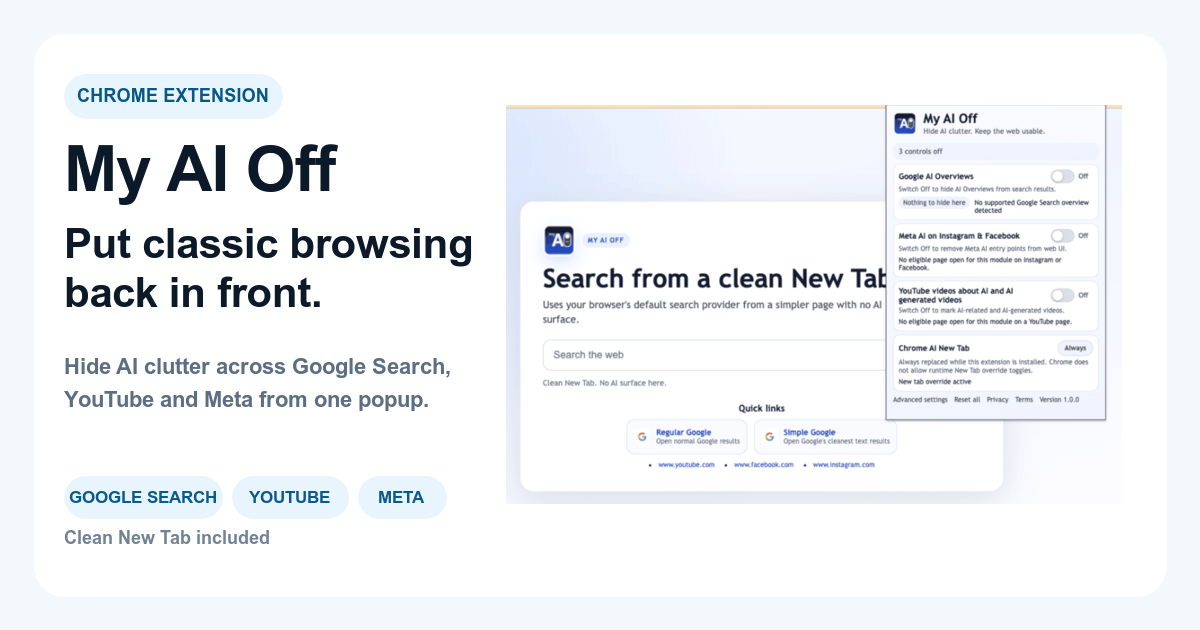
Filtering Precision: Does the extension simply hide videos based on broad categories, or does it offer granular control over keywords, channels, and other metadata? Some extensions focus narrowly on AI overviews in search, while others provide a broader approach to content filtering across various platforms, including YouTube. For example, extensions like My AI Off are specifically designed to target and filter AI videos and content blocks directly within YouTube's interface.
Ease of Use: Is the interface intuitive? Can you easily add or remove custom filters? A tool that is too complex to configure defeats the purpose of simplifying your browsing experience.
Performance Impact: Does the extension slow down your browser or YouTube experience? Effective blockers should operate efficiently in the background without noticeable performance degradation.
Customization Options: Look for features like whitelisting trusted channels, creating custom keyword blacklists, or adjusting the strictness of the AI detection. This allows you to tailor the filtering to your personal preferences.
Regular Updates: YouTube's interface and algorithms change frequently. An effective extension must be regularly updated by its developers to maintain compatibility and continue to block AI content effectively. Choosing a tool with active development ensures long-term reliability.
Before committing, review user feedback and available documentation to ensure the extension aligns with your expectations for how to hide ai videos on youtube effectively. Many users combine a dedicated AI filter with a general-purpose ad blocker for a truly uncluttered experience.
Scenarios: Applying AI Video Filters to Your Feed
Here are practical situations demonstrating how to manage AI content on YouTube, helping you make informed decisions about your viewing experience: Here are practical situations demonstrating how to manage AI content on YouTube, helping you make informed decisions about your viewing experience:
| Scenario | Recommended Option | Alternative Option | What To Avoid | Explanation |
|---|---|---|---|---|
| Focused Learning Sessions | Browser extension (e.g., My AI Off) with aggressive keyword filters. | YouTube's 'Don't Recommend Channel' for known AI education channels. | Relying solely on 'Not Interested' clicks. | When studying, you need to proactively block AI content on YouTube to ensure academic integrity and prevent distractions. An extension provides continuous filtering. |
| Casual Browsing Annoyance | Browser extension with default AI detection and mild keyword filters. | Manually blocking channels producing repetitive content as encountered. | Ignoring the issue and hoping AI videos disappear. | For everyday viewing, you want a balance between discovery and avoiding low-quality, generic AI recommendations. An extension automates the removal of common offenders. |
| Identifying AI-Generated Videos | Install an AI content highlighter extension or use common pattern recognition. | Waiting for explicit 'AI generated' labels from YouTube. | Blindly trusting all content as human-created. | Learning to spot synthetic voices, repetitive visuals, or overly sensational AI titles is key to understanding what you're filtering. A tool can help initially identify these patterns. |
| Protecting Children's Viewing | Parental control software with content filters; browser extension for specific profiles. | Strict supervision and manual curation of watchlists. | Allowing unsupervised free browsing. | AI content can be repetitive and uninformative. Automated filters ensure a more enriching and safer viewing environment without constant parental intervention. |
| Research & Information Gathering | Browser extension with custom negative keyword lists (e.g., '-AI', '-summary'). | Cross-referencing information from multiple non-YouTube sources. | Accepting initial search results without critical evaluation. | During research, it's crucial to filter out potentially inaccurate or shallow ai generated videos that might masquerade as authoritative sources. |
| Managing Creator Subscriptions | Browser extension to filter AI from non-subscribed recommendations, but keep subscribed content. | Unsubscribing from channels that occasionally use AI. | Allowing AI videos to dilute your curated subscription feed. | You want to support human creators. An extension lets you preserve your subscriptions while still reducing unwanted AI content in your broader feed. |
| New AI Features on YouTube | Use a comprehensive ai video blocker that is regularly updated. | Waiting for YouTube to provide built-in controls. | Assuming manual methods will always suffice. | YouTube continuously experiments with new AI features. A robust, updated extension is better equipped to adapt and provide ongoing control as the platform evolves. |
Beyond Videos: Controlling Broader AI Clutter
The challenge of ai generated videos on YouTube is part of a larger trend of AI integration across many online platforms. The challenge of ai generated videos on YouTube is part of a larger trend of AI integration across many online platforms. Google Search now features AI Overviews, social media sites like Facebook and Instagram are introducing Meta AI interface blocks, and numerous websites are experimenting with AI-driven content generation. This pervasive presence of AI clutter can detract from the user experience, making it harder to find authentic information or connect with real people.
Just as you might choose to hide ai videos youtube, you can extend this control to other digital spaces. Browser extensions are increasingly designed as unified control surfaces to manage AI interventions across multiple sites. This means a single tool could not only clean up your YouTube feed but also remove AI Overviews from Google search results and disable Meta AI blocks on social media platforms. This holistic approach empowers users to reclaim focus and browsing control wherever AI tends to create clutter.

Maintaining a Clean YouTube Experience
Keeping your YouTube feed free from unwanted AI content requires an ongoing strategy. Keeping your YouTube feed free from unwanted AI content requires an ongoing strategy. The platform's algorithm is dynamic, and new forms of AI-generated media continuously emerge. Therefore, your approach to filtering should adapt and evolve.
Regularly Review and Update Filters
Even with an advanced ai video blocker , periodically review your custom filter lists. Even with an advanced ai video blocker, periodically review your custom filter lists. If new types of AI videos start appearing, add relevant keywords or channel names to your block list. Conversely, if a filter becomes too broad and hides legitimate content, refine it to allow desired videos to pass through. Think of it as periodic maintenance for your digital environment.
Stay Informed About New AI Trends
Pay attention to discussions about new AI capabilities and how they might impact content creation on platforms like YouTube. Pay attention to discussions about new AI capabilities and how they might impact content creation on platforms like YouTube. Understanding the latest trends in synthetic media can help you anticipate new forms of AI clutter and proactively adjust your filtering strategy. This awareness ensures you remain ahead of algorithmic changes rather than constantly playing catch-up.
Combine Tools for Comprehensive Control
For the most robust defense against AI clutter, consider using a combination of tools. For the most robust defense against AI clutter, consider using a combination of tools. A dedicated AI filtering extension like My AI Off, which targets specific AI elements, can work in tandem with a general-purpose ad blocker or a privacy-focused extension. This multi-layered approach provides not only a clean YouTube feed but also a faster, more secure, and less distracting overall browsing experience across the web. This comprehensive setup empowers you to truly customize and control your digital consumption, ensuring you see content that genuinely aligns with your interests and needs.
Frequently Asked Questions
Frequently Asked Questions.
- How can I permanently hide AI videos on YouTube?
- To permanently hide AI videos, install a browser extension designed as an AI content blocker. These tools use advanced filtering to remove AI-generated content from your YouTube feed and search results automatically, offering a more consistent solution than manual clicks.
- Are there specific keywords to filter out AI content?
- Yes, you can use keywords like 'AI generated,' 'AI voice,' 'synthetic,' 'chatbot,' or 'summary' in a browser extension's custom filter settings. Adding ' -ai' to your YouTube search query can also help exclude AI-related results.
- Does YouTube have built-in features to block AI content?
- YouTube offers 'Don't Recommend Channel' and 'Not Interested' options for individual videos. While helpful for occasional adjustments, these are manual and reactive, requiring continuous effort to manage the volume of AI-generated content.
- Will blocking AI videos affect my other YouTube recommendations?
- When using a browser extension, it specifically targets and filters content identified as AI. This should result in a cleaner feed overall, reducing low-quality AI content while preserving recommendations for human-created videos you might enjoy.
- What's the difference between an AI video blocker and an ad blocker?
- An AI video blocker specifically identifies and hides AI-generated content, often based on patterns or keywords. An ad blocker primarily stops advertisements. While some AI content might appear as ads, a dedicated AI blocker provides more precise control over content type.