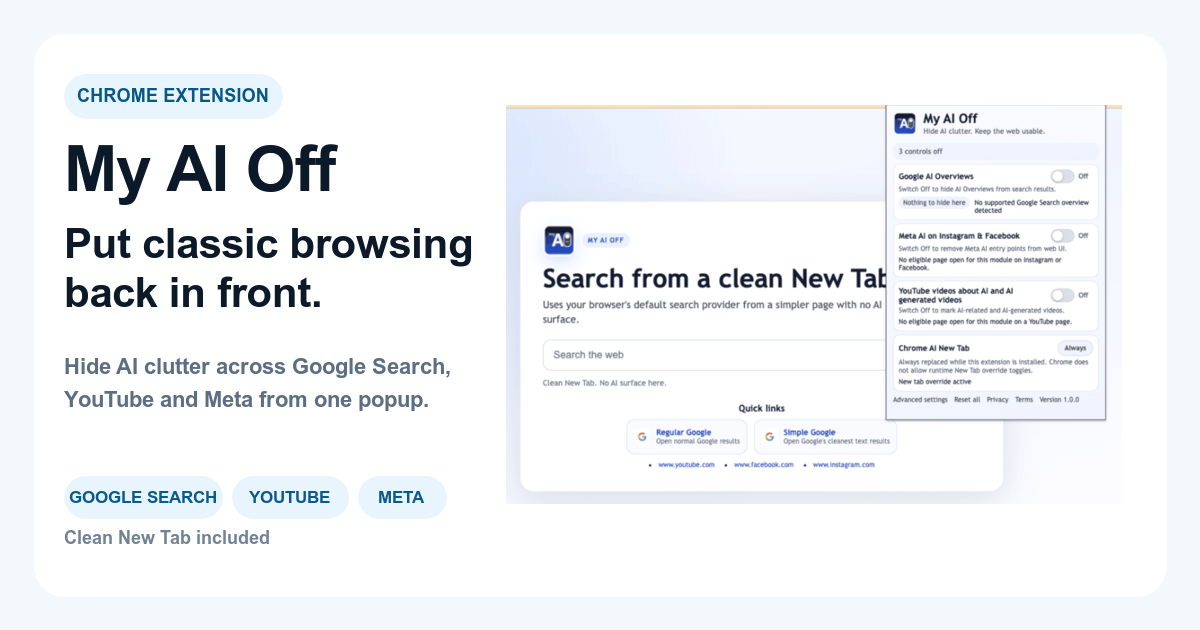
Removing AI summaries from YouTube recommendations is achievable using browser extensions designed to filter AI-generated content. These summaries, increasingly present on YouTube's interface, often disrupt user control and introduce unwanted clutter, making client-side filtering tools the most reliable approach to restore a focused viewing environment.
Why YouTube Displays AI Summaries and Their Impact
YouTube consistently tests and integrates AI-driven features to enhance user engagement and provide rapid insights into video content. YouTube consistently tests and integrates AI-driven features to enhance user engagement and provide rapid insights into video content. These AI summaries typically manifest as condensed text blocks positioned beneath video thumbnails in recommendations, search results, or even within video descriptions. The primary aim is to save viewers time, encourage clicks, and quickly convey a video's topic or key moments. However, for many users, this algorithmic push introduces visual noise, preempts the viewing experience, or spoils content by revealing crucial details prematurely. Such summaries can also overshadow the creator's original description, diminishing the human element of content discovery. Understanding YouTube's design intent clarifies why native platform settings often fail to address a user's desire for a cleaner, less algorithmically-controlled feed. Individuals seeking intentional content discovery or an uninterrupted learning session frequently find these features more intrusive than helpful, pushing them to seek methods for regaining control over their browsing experience.
Scenario: Casual Browsing Distractions
User Situation: You are casually exploring new videos across various topics on YouTube, but frequently encounter AI-generated summaries that reveal plot points for entertainment videos or give away key takeaways for educational content you prefer to discover on your own. This constant exposure diminishes your enjoyment and sense of discovery. Recommended Option: Install a dedicated browser extension like My AI Off. Configure the extension to specifically block AI summaries on YouTube. This provides an immediate, automated filtering layer that operates in the background to hide the unwanted text. Alternative Option: Manually scroll past each summary or try to ignore them mentally. This approach demands continuous vigilance and adds unnecessary cognitive load during what should be a relaxed activity. What To Avoid: Spending time searching for a 'disable AI summaries' option within YouTube's native settings. No such feature exists directly, leading only to frustration and wasted effort. Explanation: A targeted extension identifies and hides the specific HTML elements containing AI summaries before they fully render, allowing for truly passive browsing without algorithmic interruptions that disrupt the user experience.
How to Distinguish AI Summaries from Creator-Authored Content
Accurately identifying the difference between an AI summary and a video creator's original description is crucial for effective content filtering. Accurately identifying the difference between an AI summary and a video creator's original description is crucial for effective content filtering. AI summaries often employ distinct phrasing, such as bulleted lists labeled 'Key moments' or 'Topics covered,' and are usually presented in a visually separate block from the main video information. They might also feature a small AI icon or a disclaimer indicating algorithmic generation, designed to offer a rapid, machine-derived overview of the video's content. In contrast, standard video descriptions are meticulously crafted by the content creator. These human-written descriptions typically reflect a personal voice, provide additional context, share relevant links, or include calls to action. They usually reside within the video's primary information panel, distinctly separate from any algorithmic additions. While YouTube frequently updates its interface layouts, the core characteristic of AI summaries-their algorithmic origin and distinct presentation-remains a consistent identifier. Learning to differentiate these elements helps users confirm what they are seeing is indeed an AI summary, which then informs their choice of removal strategy. This distinction is foundational to controlling your YouTube feed and filtering AI recommendations effectively.

Browser Extensions: The Primary Solution for Removing AI Summaries
Browser extensions represent the most robust and efficient method for removing AI summaries from your YouTube experience. Browser extensions represent the most robust and efficient method for removing AI summaries from your YouTube experience. Unlike server-side changes controlled by YouTube, extensions operate client-side, modifying the page's content directly within your browser before it ever appears on your screen. These tools function by scanning the loaded page for specific patterns, keywords, or HTML structures that YouTube utilizes exclusively for its AI-generated content. Once a match is found, the extension can then hide or completely remove these elements from the Document Object Model (DOM). This client-side approach ensures a consistent user experience because filtering occurs locally, giving you immediate and reliable control over your viewing environment. Dedicated extensions are often more precise than general ad blockers, as they are specifically engineered to target various forms of AI clutter, including text summaries, AI-generated videos, and other algorithmic interventions, without inadvertently affecting desirable parts of the site. For anyone prioritizing digital well-being and a focused browsing experience, these extensions are an indispensable tool for reclaiming browsing control. The My AI Off extension, for example, offers specific controls to achieve this.
How Extensions Target YouTube's AI Summaries
Extensions designed to filter AI content actively analyze the structure of the YouTube page as it loads. Extensions designed to filter AI content actively analyze the structure of the YouTube page as it loads. They search for distinct HTML classes, IDs, or specific text patterns that reliably identify AI-generated summaries. For instance, an extension might look for a div element with a particular class name known to house AI-derived text, or it might identify specific phrases like "Key moments in this video" within a recognized section. When the extension detects these indicators, it applies CSS rules, such as display: none;, to hide the element, or it can even remove the element from the DOM entirely. This process occurs in real-time, making the AI summary disappear almost instantaneously upon page load. The efficacy of an extension largely depends on its ability to adapt to YouTube's frequent interface updates, underscoring the importance of using actively maintained and updated tools. These extensions function as a custom filter layer over your browsing, ensuring that content you actively choose not to see never visually intrudes on your experience.
Scenario: Dedicated Focus on a Topic
User Situation: You are deep into researching a specific subject on YouTube for a school project or professional development. AI summaries, while intended to be helpful, frequently give away too much information or direct your attention prematurely, disrupting your critical thinking process and desire for thorough exploration. Recommended Option: Utilize a specialized browser extension that filters YouTube AI videos and summaries. Enable its feature to hide AI summaries in both recommendations and search results to ensure your discovery process remains uninfluenced by algorithmic shortcuts. Alternative Option: Limit your research to pre-vetted channels or rely on manually curated playlists. This approach, however, severely restricts your ability to discover new, relevant content through YouTube's broader search or recommendation engine. What To Avoid: Using general ad blockers. They typically lack the granularity to specifically distinguish and remove only AI summaries without potentially affecting other desired parts of the YouTube interface or blocking creator-provided information. Explanation: A targeted extension preserves your mental space for original thought and prevents algorithmic suggestions from prematurely dictating your learning path, aligning perfectly with an in-depth research methodology and enabling clean YouTube learning sessions.
Beyond Summaries: Comprehensive YouTube AI Control
Focusing solely on AI summaries addresses one specific annoyance, but YouTube's pervasive algorithmic presence extends far beyond these text blocks. Focusing solely on AI summaries addresses one specific annoyance, but YouTube's pervasive algorithmic presence extends far beyond these text blocks. A truly comprehensive approach to managing your YouTube experience involves gaining control over a wider range of AI-driven elements. This includes not only text summaries but also identifying and filtering out overtly AI-generated video recommendations, managing autoplay features, and potentially recognizing artificially created video content. Tools that offer broader control over your YouTube feed provide a unified surface for managing these various aspects of algorithmic clutter. By choosing a solution that addresses multiple forms of AI intervention, you can cultivate a truly personalized and distraction-free viewing environment. This holistic perspective ensures that your YouTube usage aligns with your intent, whether for entertainment, education, or casual browsing, free from unexpected and unwanted algorithmic influences. Reclaiming your YouTube means actively shaping what you see and what you don't, giving you agency over a platform often dominated by algorithms.

Scenario: Avoiding AI-Generated Video Content Entirely
User Situation: Beyond just summaries, you want to avoid encountering any video content that appears to be entirely AI-generated or heavily reliant on AI for its creation, preferring human-created content to ensure authenticity and quality. Recommended Option: Use a robust browser extension that not only blocks AI summaries but also features capabilities to identify and hide AI-generated videos from your feed and search results. This provides a more comprehensive filtering solution at the content level. Alternative Option: Rely on subjective judgment to avoid clicking such videos, which is increasingly time-consuming and prone to error as AI-generated content becomes more sophisticated and harder to discern from human-made content. What To Avoid: Simply blocking a few channels. AI-generated content can originate from numerous sources, and new channels emerge constantly, making a channel-by-channel blocking strategy inefficient and ineffective in the long run. Explanation: A dedicated extension provides a proactive filter based on content origin and characteristics, helping ensure your feed is populated by human creativity rather than algorithmic production, thereby enhancing content authenticity and your viewing preferences.
Scenario: Maintaining a Clean Feed for Kids or Family
User Situation: You share a family computer or want to ensure a cleaner, less algorithmically-driven YouTube experience for children. Minimizing AI summaries and potentially AI-generated videos is crucial to prevent exposure to low-quality, misleading, or irrelevant content, fostering a safer browsing environment. Recommended Option: Install a comprehensive AI-blocking browser extension on the shared browser profile. Configure it to aggressively block AI summaries, AI-generated videos, and other related algorithmic clutter. This establishes a consistent, protective layer across all viewing sessions. Alternative Option: Supervise all viewing sessions, which is impractical for extended use, or rely exclusively on YouTube Kids, which has its own content limitations and does not directly address AI summaries present in the main YouTube platform. What To Avoid: Assuming YouTube's built-in parental controls will adequately filter AI-specific content. These controls are broader and do not specifically target the nuances of AI-generated content or summaries, leaving gaps in protection. Explanation: A browser extension offers a practical, active defense against various forms of AI clutter, contributing to a safer and more focused YouTube environment for younger viewers or anyone seeking a more curated family-friendly experience.
Limitations of YouTube's Built-in Controls
While browser extensions offer the most comprehensive solution for AI summaries, some users initially explore YouTube's native manual controls. While browser extensions offer the most comprehensive solution for AI summaries, some users initially explore YouTube's native manual controls. It is important to understand that YouTube does not currently offer a direct 'turn off AI summaries' toggle. The primary manual interactions available involve using feedback options such as 'Don't recommend channel' or 'Not interested.' These features are designed to refine video recommendations based on content type, creator, or overall relevance, not to specifically remove AI-generated interface elements. Similarly, reporting content as misleading or spam is generally intended for policy violations and not for features you simply dislike. These manual controls are inherently reactive and largely ineffective against the persistent appearance of AI summaries, which are integrated as core elements of YouTube's interface design. While they might subtly alter the type of videos recommended, they will not reliably eliminate the presence of the summary blocks themselves. For genuine control over UI elements like AI summaries, a more proactive, client-side intervention is necessary. This distinction highlights why dedicated tools are essential for effectively managing AI clutter on platforms like YouTube.

Scenario: Attempting Manual Controls for AI Summaries
User Situation: You are bothered by AI summaries in your YouTube feed but are hesitant to install browser extensions. You repeatedly try using YouTube's built-in 'Not interested' or 'Don't recommend channel' options on videos that happen to feature these summaries, hoping they will disappear. Recommended Option: Reconsider using a browser extension like My AI Off to hide AI videos on YouTube. While manual feedback can indeed influence future video recommendations based on content, it does not directly target or remove the AI summary blocks themselves from the interface. The solution you are attempting does not match the problem, leading to ongoing frustration. Alternative Option: Continue using manual feedback, but understand that you are primarily influencing the type of content YouTube recommends, not the presence of the AI summary feature. You will still regularly encounter summaries on other videos. What To Avoid: Operating under the belief that consistently clicking 'Not interested' on videos with AI summaries will eventually make the summaries vanish. This misconception leads to wasted time and continued exposure to the unwanted feature. Explanation: YouTube's feedback mechanisms are designed for refining content suggestions, not for user interface element removal. AI summaries are a persistent UI feature, making manual content-based feedback ineffective for directly addressing their presence.
Making a Practical Decision for Your YouTube Experience
Selecting the optimal approach to manage AI summaries on YouTube depends primarily on your comfort level with browser tools and your desired degree of control. Selecting the optimal approach to manage AI summaries on YouTube depends primarily on your comfort level with browser tools and your desired degree of control. For most users seeking a clean and focused experience, a dedicated browser extension offers the quickest, most thorough, and least intrusive solution. These extensions are specifically built to target and remove the visual elements of AI summaries, restoring a cleaner interface. If your goal extends beyond just summaries to include blocking AI videos or other forms of algorithmic clutter, a comprehensive tool that handles multiple AI surfaces will be more beneficial. Carefully consider the tradeoffs: extensions provide power and precision but require installation and occasional updates, whereas manual methods are built into the platform but are largely ineffective for this specific issue. Your ultimate choice should align with how deeply you wish to customize your YouTube browsing and how much proactive control you want to exert over your content feed.
Taking back control of your YouTube experience means actively choosing what content and interface elements you engage with. It's about empowering your browsing decisions against an ever-present algorithmic push, making the platform work for you.
To choose the best approach, consider these steps:
- Identify the Scope of the Problem: Determine if you are solely bothered by AI summaries or if you also want to filter out AI-generated videos, broader AI-driven recommendations, or other algorithmic elements present on YouTube.
- Assess Your Technical Comfort: Consider whether you are comfortable installing and configuring a browser extension. If not, be aware of the significant limitations inherent in relying on manual alternatives for UI element removal.
- Prioritize Control vs. Effort: Decide if you prefer a set-and-forget solution that offers immediate visual changes or if you are willing to continuously provide feedback with minimal impact on the presence of AI summaries.
- Research Extension Features: Look for extensions that explicitly mention YouTube AI summary blocking and offer additional filtering capabilities if your needs are broader. A strong starting point would be tools like My AI Off, which provides specific controls for managing various types of AI content on YouTube.
- Consider Broader Digital Well-being: If your desire for control extends beyond YouTube to other platforms like Google search or social media, a more comprehensive AI-blocking solution might be preferable over single-purpose tools. For broader comparisons, explore guides that review My AI Off vs. single-purpose blockers.
Scenario: Educational Content Focus
User Situation: You frequently use YouTube for educational purposes, such as learning a new skill or following academic lectures. AI summaries, even when seemingly relevant, often strip away the nuance and context that you prefer to gain directly from the video itself, making your learning feel superficial. Recommended Option: Employ a browser extension that blocks AI summaries to ensure you engage with the full, unsummarized content, allowing you to form your own comprehensive understanding. This approach directly supports a focused learning environment. Alternative Option: Mentally filter out the summaries as you watch, but this introduces additional cognitive load during what should be a highly focused learning activity. What To Avoid: Relying on YouTube's 'transcript' feature as a direct substitute for watching the video. While useful, it still bypasses the original presentation and does not remove the summary from the interface, thus not addressing the core problem. Explanation: For deep and meaningful learning, direct engagement with the source material is paramount. Removing AI summaries helps maintain the integrity of the learning process by preventing premature conclusions or superficial understanding derived from algorithmic shortcuts.
| Method | Effectiveness for AI Summaries | Ease of Implementation | Pros | Cons |
|---|---|---|---|---|
| Browser Extension (e.g., My AI Off) | High | Easy (install & activate) | Instant, consistent, precise UI control | Requires browser installation, needs occasional updates |
| YouTube 'Not interested' / 'Don't recommend' | Low | Easy (click menu) | Built-in to YouTube, influences content type | Doesn't remove summary UI, only impacts video suggestions |
| Reporting Content | Very Low | Moderate (navigation) | Targets policy violations/inappropriate content | Not designed for feature removal, often ineffective for this purpose |
| Manual Scrolling / Ignoring | Zero (visual removal) | None (passive action) | No installation needed, immediate action | High mental load, constant distraction, no actual UI removal |
Frequently Asked Questions
Frequently Asked Questions.
- Can I turn off AI summaries on YouTube through its settings?
- No, YouTube does not currently offer a native setting or toggle to disable AI summaries in your recommendations or search results. These are integrated algorithmic features designed by the platform.
- Are AI summaries the same as video descriptions?
- No, they are distinct. AI summaries are algorithmically generated overviews, typically in a separate block, providing quick insights. Video descriptions are written by the creator, offering their own context and details.
- Will a general ad blocker remove AI summaries from YouTube?
- Most general ad blockers are not specifically designed to target and remove AI summaries. While some may block certain elements, a dedicated AI-blocking browser extension is more effective and precise for this purpose.
- What is the most effective way to remove AI summaries on YouTube?
- The most effective method is to use a browser extension specifically designed to block AI-generated content and interface elements on YouTube, such as the My AI Off extension. These tools actively filter content within your browser.
- Does reporting AI summaries help remove them?
- Reporting content to YouTube is typically for policy violations or inappropriate material. While you can provide general feedback, it is unlikely to directly remove the AI summary feature from the platform for all users or your personal view.
- Can blocking AI summaries also block AI-generated videos?
- Some comprehensive AI-blocking browser extensions offer features to block both AI summaries and to identify and hide AI-generated videos within your YouTube feed. Look for extensions with broader AI content filtering capabilities like My AI Off.